
Smart CCTV — one console for every scene
In-house sample app — one live operations console on cameras already on the wall. Store door, checkout wait and car park bays are tested; waiting room, hotel lobby, cafe queue and corridor footfall are in testing. Anonymous counts.
Client: In-house sample
Stack: Python, YOLO11 + BoT-SORT tracking, HTML console
- Application
- Turnkey app
- Sample
- CCTV
- Retail
- Hospitality
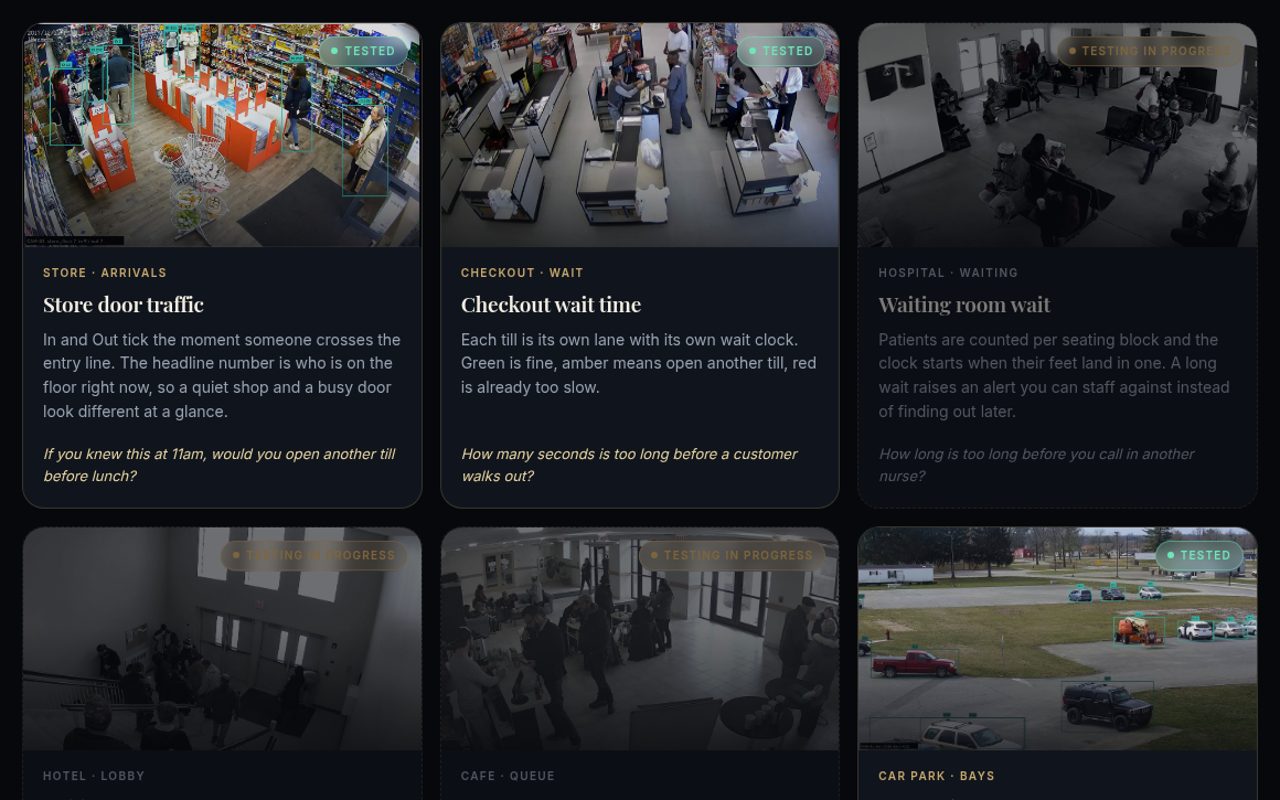
This is an in-house sample, not a client case. It started as a door-and-checkout demo for a shop. The latest delivery turns it into a site platform: one console, seven camera scenes, and the same screen answers the same way whichever camera you pick. The analytics underneath stay the same; only the zones change.
Live demo: Smart CCTV · every use case on one console
What is in the latest delivery
| Scene | Status | What it shows |
|---|---|---|
| Store door · IN / OUT | Tested | In and Out when feet cross the gold ENTRY LINE; Now in store is who is on camera now |
| Checkout · wait time | Tested | Each till is a lane with its own wait clock — green / amber / red thresholds you set |
| Car park · bays | Tested | Parked vehicles inside the bay outlines against the stall count — free bays, occupancy %, and a loiter alert |
| Hospital waiting room | Testing | People per seating block, a wait clock per block, and a long-wait alert |
| Hotel lobby | Testing | Entries and exits across the door mats, plus lobby occupancy |
| Cafe queue | Testing | Counter and queue zones, each with its own wait |
| Mall corridor · footfall | Testing | IN / OUT across a mid-hall line |
Scenes still being validated are shown dimmed and badged Testing in progress, so a visitor always knows what is proven and what is next.
How it works on the day
- Existing cameras — runs on recorded clips or a live RTSP feed from CCTV already on the wall; no new hardware in the demo
- Use-case cards — every camera is a card on the landing page; click one to open the console on that scene
- Instant first frame — switching cameras never flashes the previous camera’s picture while the new one starts
- Present it live — Start Demo, Stop, Reset and a full-screen theater view, so you can freeze the numbers while you talk and rewind for the next guest
- Draw your own zones — drag the entry line, draw till lanes, and see the counts follow
- Per-minute table — peak occupancy each minute, plus IN / OUT or the longest wait
- One site file — cameras, zones, lines and thresholds live in one site configuration, so a new branch or floor is a new file, not a new app
Privacy by design
- Anonymous counts — no names, no face gallery; people as numbers
- Per-camera, per-session IDs — tracking IDs are not joined across cameras, and appearance data is not stored
- Locked down by default — the console binds to the local machine unless you open it up, with access tokens for the console and its APIs
What we can build for you
A branded version of this for a shop, F&B floor, hotel lobby, clinic waiting area or car park — your cameras, your zones and wait rules, your logo, and WhatsApp to you. Same class of work as other turnkey apps: a screen a manager can run, not another brochure page.